

How to Check the Hardware ID for a Windows Device
All hardware equipment inside and connected to personal computers uses an identifier to uniquely identify itself. This allows operating systems to recognize the device and install the necessary software for it. In Windows, this generally means that a device driver for the hardware is installed. The hardware ID for a device can be checked to locate a driver for it.
The hardware identifier is a combination of the bus type, the hardware manufacturer (or vendor), and the device identifier. In some cases, additional sub-system identifiers and revision information is included to distinguish between variations of a device.
So when you are looking for a device driver for a piece of hardware, it is useful to know the hardware id of the device. This can tell you which manufacturer made the device and help you find a device driver. Read on to find out how to check the hardware ID for a device in Microsoft Windows. The steps are valid for Windows XP all the way up to Windows 11.
Check the Hardware ID using the Windows Device Manager
The hardware id for a device in Windows can be found in the Windows Device Manager. To check the hardware id for a device, follow these steps:
- Open the Device Manager from the Control Panel. You can also type “devmgmt.msc” at the Run option in the Start menu (or menu Search option for Windows 7 and newer).
- In the Device Manager, right-click the device, and select Properties in the popup menu.
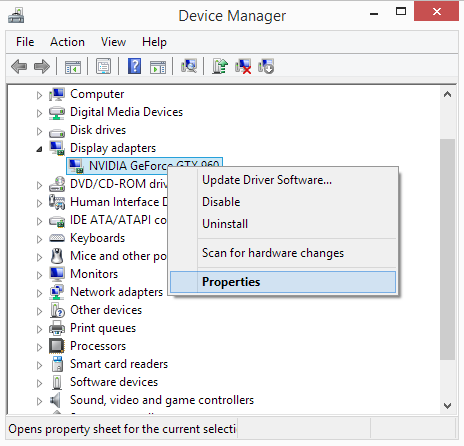
- Next, select the Details tab.
- Now select the entry called Hardware Ids in the Property dropdown list.
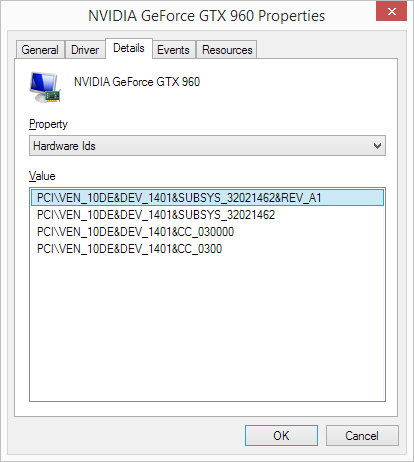
As you can see in the screenshot, there can be multiple hardware ids for a device. The top one is the most specific identifier, and going down, the identifiers are more generic. The reason this is done is to allow a device driver to be selected based on a match to any of these hardware identifiers. This allows drivers to be used that are applicable to variations of devices.
The hardware manufacturer in this example is NVidia, which is identified by VEN_10DE.
Obviously, this is a device for which a driver is already installed, and the manufacturer and model for the device are shown. But the hardware id is also available for unknown devices and not recognized devices. This way, the hardware id, or Windows device ID, can be used to find the correct driver for the device. If no exact match for the driver is available, you can also check out the Compatible Ids by selecting that as the Property selector.
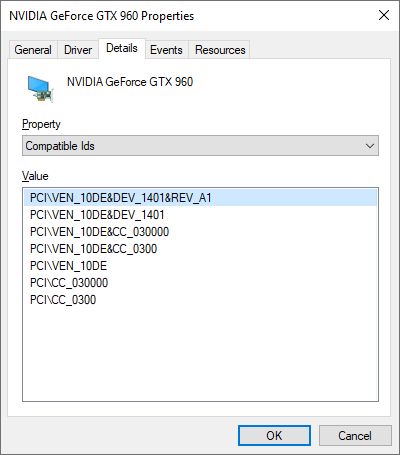
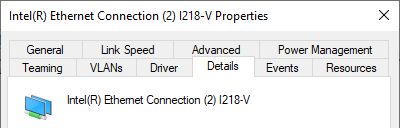
Note: Depending on the hardware device, the number of tabs in the device properties dialog will vary. But there will always be a Details tab as used in the steps in this guide.
Programs like DriverFinder use the hardware id and the compatible id to find a matching driver for a device as well. This way these programs can find a driver for a device to match the hardware and Windows version.
FAQs
What is a hardware ID?
The hardware ID for a device is an identifier for a piece of computer hardware. Think of a sound card, or a webcam, for example. The hardware ID is vendor-specific. A hardware ID consists of a device class, vendor identifier, device identifier, subsystem identifier (different versions of the device), and a revision number. An example of a hardware ID is: PCI\VEN_8086&DEV_9A49&SUBSYS_14321043&REV_01
Revisions can be used for updates of firmware on the same device for example.
Is hardware ID the same as Device ID?
Yes, the hardware ID is often referred to as the device ID.
Is the hardware ID the same for all Windows versions?
A hardware ID is specific to a device. So, it is linked to the equipment, not the operating system. The hardware ID will not change for different Windows versions.
How do I find the hardware ID?
The hardware ID for a device can be found in the Windows Device Manager. In each version of Windows, the steps are the same. Open the Device Manager, right-click the device, select Properties, select the Details tab, and under Property select Hardware Ids. The Value shown contains the hardware ID(s) for the device.
What is the hardware ID used for?
The hardware ID is used by Windows to identify the device and find a device driver for it. Microsoft finds a driver in the repository or the Windows Update catalog. If no driver is available with Microsoft, a driver from the manufacturer needs to be installed to allow communication between Windows and the device.
What is a compatible ID?
The compatible IDs for a device are also hardware IDs. The difference is that a hardware ID is unique to a single device, while compatible IDs can apply to multiple devices. The compatible IDs identify the device as a piece of equipment of a certain category that can be used for certain functions. This is important if no unique device driver is available for a device. A driver for a compatible ID of the device can enable Windows to still communicate with the device.
Do Virtual Devices also have a hardware ID?
Yes, virtual devices in Windows also have a hardware ID. These devices also need software to function, and need to be identified as a device within Windows. Examples are:
Intel(R) Virtual 82566 Gigabit Network Connection (PCI\VEN_8086&DEV_10B7)
Logitech Gaming Virtual Mouse (LogiDevice\VID_046D&PID_C231)
HP 530T DP Virtual Bus Device (pci\ven_14e4&dev_16af&subsys_18d3103c)
Entry Filed under: Device Drivers
318 Comments Add your own
1. syed kareem | April 30th, 2013 at 4:53 pm
i want the netwrok controller driver for the given hardware id. please mail me the link or else commont soon…. please i can’t access the net
vPCI\VEN_14E4&DEV_4727&SUBSYS_1483103C&REV_01
PCI\VEN_14E4&DEV_4727&SUBSYS_1483103C
PCI\VEN_14E4&DEV_4727&CC_028000
PCI\VEN_14E4&DEV_4727&CC_0280
2. Andy | May 1st, 2013 at 1:16 am
@syed kareem – That’s a Broadcom 4313 802.11b/g/n wireless device.
Which driver you will need partly depends on your Windows version.
An example of a compatible driver is the HP Elitebook driver.
3. AMBROSE | May 11th, 2013 at 5:39 am
please which driver can i use for hp probook 4530s id PCI\VEN_10EC&DEV_8176&SUBSYS_1629103C&REV_01
PCI\VEN_10EC&DEV_8176&SUBSYS_1629103C
PCI\VEN_10EC&DEV_8176&CC_028000
PCI\VEN_10EC&DEV_8176&CC_0280
please help and send me link……4
4. Andy | June 2nd, 2013 at 3:29 pm
@AMBROSE – Your hardware ID is for a Realtek network driver. You can use the download from the Realtek download site for the 8192ce chipset.
Or try the download from the HP support site for your laptop. You need to still pick your Windows version in that link.
5. pasc | June 5th, 2013 at 4:55 pm
I need help with network controller drivers for card of the following device id:
PCI\VEN_8086&DEV_0887&SUBSYS_40628086&REV_C4
PCI\VEN_8086&DEV_0887&SUBSYS_40628086
PCI\VEN_8086&DEV_0887&CC_028000
PCI\VEN_8086&DEV_0887&CC_0280
6. Andy | June 6th, 2013 at 2:25 pm
@pasc – That device ID is for an Intel(R) Centrino(R) Wireless-N 2230 device. So you will need to download and install the Intel wireless device driver for that. If you let me know what Windows version you are running, I can point you to a download link.
7. moslem | June 16th, 2013 at 11:05 pm
hi i can’t find driver for hp fingerprints, please send download link
USB\VID_138A&PID_0005&REV_0<90
8. Andy | June 17th, 2013 at 2:19 pm
@moslem – What windows version are you running? Different Windows version and architectures have different drivers.
For Windows 8, 64-bit for example you could use this HP download link.
9. Phil | June 24th, 2013 at 10:15 pm
Hi,
Could you please help me with these?
PCI\VEN_10EC&DEV_8168&SUBSYS_2AF3103C&REV_0C
PCI\VEN_168C&DEV_0032&SUBSYS_1838103C&REV_01
I’m looking for win7 64-bit drivers.
Many thanks!
10. Andy | June 26th, 2013 at 3:21 am
@Phil – The first one is a Realtek network controller. The Realtek driver download for Windows 7 should work for that.
The second one is an Atheros AR9485 802.11b/g/n WiFi Adapter. Try this HP driver download for that.
11. Sivakumar | July 5th, 2013 at 10:10 am
Sir, my laptap is hp 630. I want PCI Deviced driver to install, so please tell me the how to get that driver. And hardware ID is PCI\VEN_10EC&DEV_5209&SUBSYS_3672103C&REV_01
12. Sivakumar | July 5th, 2013 at 10:13 am
Sir, I want PCI simple communication controller driver for hp 630 suitable to windows7. So kindly inform how to get thar driver. Hardware Id is PCI\VEN_8086&DEV_1C3A&SUBSYS_3672103C&REV_04
13. GANESH KHARAT | July 8th, 2013 at 8:07 am
Hi i have HP Pavilion G6 2230TX Notebook, and I have installed Windows 7 (32 bit OS),
for following devices i am not able to install drivers so please let me know the link to install the drivers or the devices manufactures
thanks in advance
Bluetooth Controller:
PCI\VEN_1814&DEV_3298&SUBSYS_18EC103C&REV_00
Ethernet Controller:
PCI\VEN_10EC&DEV_8136&SUBSYS_183E103C&REV_05
PCI Device:
PCI\VEN_10EC&DEV_5229&SUBSYS_183E103C&REV_01
SM Bus Controller:
PCI\VEN_8086&DEV_1E22&SUBSYS_183E103C&REV_04
14. Andy | July 9th, 2013 at 2:12 pm
@Sivakumar – the first (VEN_10EC) is a Realtek card reader device. The second is an Intel Management Engine Interface, for which you will need an Intel chipset driver.
The best location for the drivers is the HP support site for you laptop model.
15. Andy | July 9th, 2013 at 2:28 pm
@GANESH KHARAT – The HP Pavilion G6 2230TX seems to only be available with Windows 8 in 64-bit version. So if you want to downgrade to Windows 7, you will also need a 64-bit version of that. In that case you can use the same drivers.
For Windows 7, not all drivers might be available.
But you can try:
1) the HP Ralink Bluetooth driver for the Bluetooth Controller.
2) The Realtek ethernet drivers for the network card (Install_Win7_7048_09162011.zip on Realtek download site).
3) The Realtek card reader driver from the Realtek site for the PCI Device (RtsP2Stor_6.2.9200.29038.zip).
4) the HP SM Bus Controller driver for the last device.
Those are all available as 32-bit version.
Hope it works.
16. pavan | July 10th, 2013 at 3:30 am
canu tel me that my wifi is in orange color not in whitish color and these r ids
PCI\VEN_10EC&DEV_8168&SUBSYS_1411103C&REV_03
PCI\VEN_10EC&DEV_8168&SUBSYS_1411103C
PCI\VEN_10EC&DEV_8168&CC_020000
PCI\VEN_10EC&DEV_8168&CC_0200
17. Andy | July 11th, 2013 at 5:52 pm
@pavan – That is a Realtek PCIe GBE Family Controller in a HP system.
So this is an ethernet controller, not a WiFi controller.
18. m3 | July 13th, 2013 at 3:43 pm
i need a Universal Serial Bus controllers drive
19. Andy | July 13th, 2013 at 7:39 pm
@m3 – Okay… but there are many different devices like that. So please list your hardware ID if you need more help.
20. Richard | July 20th, 2013 at 11:16 pm
Windows Vista Business x86
PCI Simple Communications Controller Driver
PCI\VEN_8086&DEV_2E14&SUBSYS_027F1028&REV_03
PCI\VEN_8086&DEV_2E14&SUBSYS_027F1028
PCI\VEN_8086&DEV_2E14&CC_078000
PCI\VEN_8086&DEV_2E14&CC_0780
I have checked pci database and cant find the driver anywhere. Any help would be greatly appreciated.
21. Andy | July 21st, 2013 at 3:23 am
@Richard – That is definitely some variation of the Intel(R) Management Engine Interface, but I can’t find the SUBSYS part of it in any driver as well.
What computer make and model is this?
22. santosh narkar | July 22nd, 2013 at 12:43 am
Please give driver for this device
PCI\VEN_10EC&DEV_5229&SUBSYS_183E103C&REV_01
PCI\VEN_10EC&DEV_5229&SUBSYS_183E103C
PCI\VEN_10EC&DEV_5229&CC_FF0000
PCI\VEN_10EC&DEV_5229&CC_FF00
23. Andy | July 22nd, 2013 at 6:30 pm
@santosh markar – That’s a Realtek card reader for which you can download the drivers from the Realtek website.
24. Farman Ali | August 3rd, 2013 at 7:00 am
PCI\VEN_104C&DEV_8241&SUBSYS_04B01028&REV_02
PCI\VEN_104C&DEV_8241&SUBSYS_04B01028
PCI\VEN_104C&DEV_8241&CC_0C0330
PCI\VEN_104C&DEV_8241&CC_0C03
I have Dell Inspiron N5110 and looking for Universal serial bus Controller.
Can somebody tell me how to find it Please.
25. Ahmed Samir | August 4th, 2013 at 5:17 am
I need USB controller driver for my pavilion g6 2288se
PCI\VEN_8086&DEV_1E31&SUBSYS_183F103C&REV_04
PCI\VEN_8086&DEV_1E31&SUBSYS_183F103C
PCI\VEN_8086&DEV_1E31&CC_0C0330
PCI\VEN_8086&DEV_1E31&CC_0C03
26. Andy | August 4th, 2013 at 9:50 pm
@Farman Ali – That is a Texas Instruments XHCI Controller. You need the r309746.exe file, which is listed as the Wistron USB 3.0 Host Controller Driver on the Dell driver download site.
27. Andy | August 4th, 2013 at 9:56 pm
@Ahmed Samir – You did not list your Windows version, but HP only has Windows 8 64-bit support for that system. Did you check their site?
28. anurag chauhan | September 2nd, 2013 at 10:32 am
sir i have dell inspiron 14 3421 with win 8(single pack) 64 bit….my usb ports are not detecting some pen drives and those who are detecting are opening without permission. as they are connected .is it a driver problem since iti is not having a usb driver.
hardware id is
USBSTOR\DiskSanDisk_Cruzer_Pop______1.26
USBSTOR\DiskSanDisk_Cruzer_Pop______
USBSTOR\DiskSanDisk_
USBSTOR\SanDisk_Cruzer_Pop______1
SanDisk_Cruzer_Pop______1
USBSTOR\GenDisk
GenDisk
please assist as possible.
29. Andy | September 3rd, 2013 at 12:07 am
@anurag chauhan – A ScanDisk Cruzer USB stick does not require any special drivers, so this must be a problem with your USB ports or USB drivers.
Do other USB devices work properly on the same USB port?
If not, try reinstalling the chipset drivers or the USB 3.0 port drivers.
If the USB ports keep on not detecting the cruzer, try the powering down option and remove the battery for a while.
30. rahul | September 6th, 2013 at 12:16 pm
sir i a have hp2000-2313tu notebook and i have buy it few weeks back. but since some time its booting time has been increased . i have not updated my antivirus since i have bought my lappy.is that a problem????. also i couldnt get connected to any wired connection it is showing unidentified network. i have checked the drivers and the network controller driver is missing.is that a problem???. with dongal it is connecting but giving very slow speed….
Leave a Comment
Trackback this post | Subscribe to the comments via RSS Feed