

Fix Driver Irql Not Less Or Equal Error
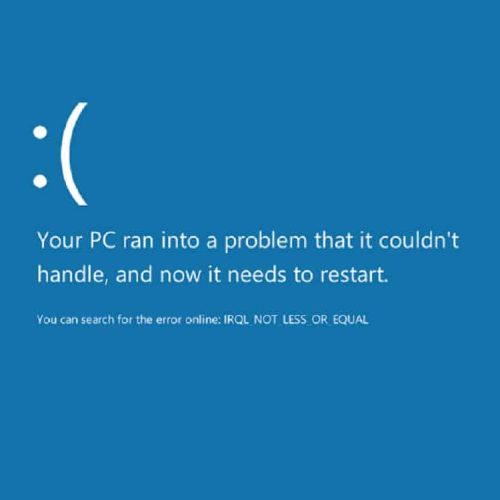
Device drivers are required to allow operating systems to communicate with computer hardware. In each new version of Windows more and more device drivers are included with the installation. But for a lot of hardware, special device drivers are required. If drivers are corrupted or not installed properly, Windows will report a device error. One of the device errors that Windows can report is a “Driver Irql Not Less Or Equal” error. This can result in a blue screen.
Causes for irql not less or equal error
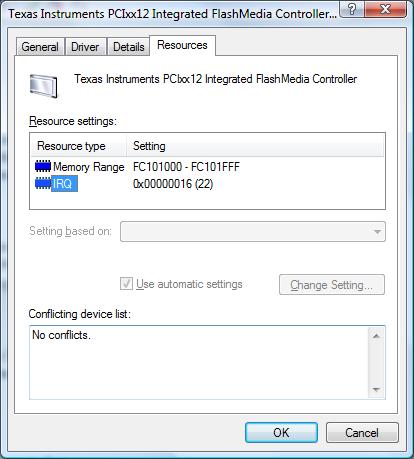
The irql not less or equal error basically indicates a problem with the system resources used by a hardware device, such as I/O address ranges, DMA, and IRQs. The IRQ is an interrupt request, which is used by the hardware to claim CPU time from the system. The number of IRQs in a PC however, is limited so sometimes different devices end up sharing an IRQ.

The Driver Irql Not Less Or Equal error can happen in any version of Windows, from Windows XP to Windows 11. The irql error can happen with the NDIS.SYS file, if the error is caused by a network or modem card, but other hardware can also be the cause of the conflict. Because of the severity of this kernel-level problem, the error results in a blue screen or stop error. Driver errors would normally be obvious because the blue screen error lists a .SYS file.
Fixing the error
#1 – Using the .SYS filename, you can find out which device or hardware is responsible for the error. You can then disable the hardware in the Windows Device Manager to see if the device is really the cause of the error. If the .SYS filename is not shown on the blue screen, use Event Viewer or a memory dump to find out the responsible driver.
#2 – Running a memory test is also a good idea, as faulty memory can be the cause of many stop errors. In the Bios, disable the quick start, so the full diagnostics are run, and a memory test can be run using the software.
#3 – In most cases, the ‘irql not less or equal’ error can be solved by updating the drivers for the device causing the error. Also make sure you update your Windows and antivirus software, as some of these errors are not caused by hardware, but software problems. You can use the Windows device manager to uninstall any currently installed driver for the device and then reinstall the latest driver. When you reboot your PC after uninstalling the drivers, Windows will detect the new hardware, which allows you to install the latest drivers for the device.
If you do not have the drivers for the device in error or are not comfortable with using the Windows device manager, you can also use a driver update program to find, download, and update all device drivers for you. Driver update software will accurately identify your hardware, including the device in error, and automatically install the latest drivers for it. This can solve driver irql not less or equal errors.
#4 – If updating the drivers does not fix the issue, try loading the default BIOS/UEFI options. This will ensure that RAM timing, FSB timing, and CPU timing are not causing the error. Further, you can check the resource assignments on the devices in the Windows Device Manager to check if there is an IRQ conflict.
#5 – Microsoft further advises that you try to load the last known good configuration using the start menu (press the F8 key during boot). But you do need to make sure that the problem does not introduce itself again as a result of changes or updates. So the best way is to find the real cause of a blue screen error and fix it.
And, for people that are still running Windows 2000, there is another possible cause for the driver_irql_not_less_or_equal error. It is related to dismounting drive volumes. Check the Microsoft knowledge base article on this to fix it.
Although we wrote this article originally with older Windows versions in mind, the error can still occur in the latest Windows versions. The basis approach to solving the error is the same, even for Windows 10 and Windows 11.
Entry Filed under: Device Errors
92 Comments Add your own
1. Blue Screen on Vista 64-b… | July 18th, 2009 at 5:29 am
[…] are the problem. Not the psu. Thats stupid to even think a driver crash would be the psu… http://www.devicedriverfinder.com/bl…or-equal-error __________________ System: E7400: O/C 3.8 GHz ~ xfx 780i sli mobo: O/C 1600 FSB ~BFG GTX 285 OC~ […]
2. NicholasHall | July 28th, 2009 at 7:57 am
good info thanx
3. Blue Screen Windows XP | November 25th, 2009 at 6:30 am
My operating system is windows XP, and i get this error screen usually when I run a large process(like having 3 or more tabs in the web browser). It says the error is caused by a system file called portcls.sys I could not find this in device manager but i did find it in ‘My Computer’. I do not know whether to remove this file in fear of causing damage to my computer that is irreversable. If you could respond to this comment for me please it would help a great deal.- Thank You
4. Andy | December 10th, 2009 at 1:59 pm
The portcls.sys file is related to the sound driver on your system. In most cases you can fix it by updating the sound driver or installing the right one.
Disabling your sound is also something you can try to check if it is really the sound driver.
5. Switchblade-DK | March 5th, 2010 at 6:46 pm
I have similar problem, but it says, that it is the CPhilMAS64.sys file that is the matter.
What is the CPhilMAS64.sys file, and how can I update it?
6. Jay | March 5th, 2010 at 9:27 pm
But how can I update a driver when it stops in the middle of installing XP. Message includes atapi.sys
I am at a loss.
7. Andy | March 26th, 2010 at 4:04 am
@Switchblade-DK – I am not familiar with that file, and the only thing I could find on it is that it might be related to a VideoMate TV tuner. Do you have a TV Tuner, and if so, do you know the brand and model?
Your Windows version is also helpful
@Jay – The atapi.sys is a disk or CD-rom related driver, so your Windows setup CD might have a problem (try copying it if possible), or you have a problem with your hard disk. Do a full NTFS disk format if you can before installing XP.
8. matt | April 13th, 2010 at 2:06 pm
when i turn my computer on it makes it as far as the windows xp loading screen than it blue screens on me and comes up with DRIVER_IRQL_NOT_LESS_OR_EQUAL at the top than at the bottom it has USBPORT.SYS ADDRESS F771A323 BASE AT F770FOOO, DATE STAMP41107D62. I cant get into windows to troubleshoot, i already flashed the bios and it didnt work. i have a asus A7N8X-LA motherboard, i dont want to buy a new motherboard and processer if i dont have to. can anybody help me out?
9. Andy | April 13th, 2010 at 7:19 pm
@matt – From your details it appears there is a problem with the USB driver. The bios would not actually help here I think.
Have you tried booting in Safe Mode (F8 during computer startup)? If that works, you can try “sfc /scannow” at the command prompt to check and correct the Windows system files.
If you can’t boot at all, you will need a Recovery CD or Windows install CD to boot in the recovery console.
10. boshack | May 17th, 2010 at 4:16 pm
hello everyone, I got this problem on my COM recently.
I’ve reinstalled my windows, so I thougth it would have resolve this blue screen error but now I’m still seeing it.
from my conclusion I’ve found my expectation of the cause of this problem whenever I use my COM and the softwares.
which is:
Orbit Downloader 2.8.17
Utorrent 2.0.2
Mozilla Firefox ver 3.5.1
Windows extreme se7en 2010 Xgamer
do you think some of those programs I’ve used can cause the error?
I’m waiting the error to happen again so I can give those “command thing” to you guys (I’m sorry I’m so noob in this thing)
thank you
11. Andy | May 17th, 2010 at 6:14 pm
@boshack – The first 2 programs should not have anything to do with the irql error. The Xgamer software is a bootable Windows image for gaming, right?
So that could cause it if the right drivers are not installed.
You should be able to tell by not using that for a while and see if the error happens at all.
12. James Dima | May 30th, 2010 at 6:05 am
thanks for the info. great job also to those who are giving free tech support.
13. Monitor wont detect Compu… | June 7th, 2010 at 4:48 am
[…] try your fix when i get back home good find! heres a fix to your problem http://www.devicedriverfinder.com/bl…or-equal-error […]
14. pornchai supawan | July 21st, 2010 at 9:50 am
Thank for knowledge.
15. Dan | July 26th, 2010 at 11:15 am
If a safe mode boot cannot be achieved, then it is not a driver issue. It is either an incompatible memory module or a bad memory module. At this point, you won’t be able to test the ram through windows.
Download Ubuntu or a recovery disk that can enable you to boot into a command line shell (aka DOS-mode) and run memtest86+. If it crashes, the memory modules are incompatible. If the ram modules are damaged, errors will occur.
If you are able to boot into a safe mode of Windows, go to System Properties > Hardware > Device Manager and check to see if there are conflicts. Uninstall the drivers that are causing the problem or disable the hardware, if possible and if that item is not needed. If that does not solve the problem, then you’ve got some investigative work to do (a combination of removing hardware and starting up the computer while checking each piece or replacing parts).
16. thebesttib | August 9th, 2010 at 11:24 pm
my computer is not getting on…so how will install new driver?
17. Verne James | November 21st, 2010 at 7:06 pm
I too have the blue screen problem and have tried a lot of the suggestions. it says “NDIS.SYS Address b9dc6150 base at b9dad000 Date stamp 481073e0. I have windows XP, i purchased and used a driver update program. in problem devices i get the keyboard, network card and ps2 mouse. I replaced the key board and it is off the list, disabled and uninstall driver to network card and it dissapears for 1 start up. replace the mouse with USB optical. Still get conflict with the mouse and card for network. I use a USB network connection. the blue screen only happens after i let it go to sleep mode. happening almost everytime now. I appreciate any help.
18. Andy | November 21st, 2010 at 8:52 pm
@Verne James – Try checking the Power Management tab in the network device properties (Device Manager). Changing the power management settings for the USB network device might help.
If not, check the power management of the USB Root Hub devices under the Universal Serial Bus Controller group. Disable the option to allow the computer to turn off the device.
19. Verne James | November 22nd, 2010 at 10:12 pm
I’ll give that a try and let you know, you guys are so helpful,,, thanks again
verne
20. Verne James | November 23rd, 2010 at 12:53 am
it still acts the same, I’ll just set it to not sleep and it works flawless. thanks
21. AngrywitTDI.sys | December 31st, 2010 at 3:22 pm
The file i am having trouble with TDI.sys, what is it and how can i fix it?
22. A guy | January 13th, 2011 at 2:09 am
running windows 7 x64, ram 8 go ok video 1 go ok (drivers too), bios ok, my computer already got bac k to the seller cause ia had multiple crashes first for irql then implying win32k.sys files, , cache_manager, pfn_list (_corrupted), etc, so normally it got fixed, but ive had 2 crashes since yesterday always driver_irql_not_less_or_equal.
I think it’s while running mozilla cause im writing now with ie x64 and it lasts more than the five minutes under firefox. So is it possible that running mozilla makes my comp have a driver irql?
23. Andy | January 13th, 2011 at 8:17 am
@AngrywitTDI.sys – The TDI.sys error is related to the network driver from Microsoft. You can try restoring it from the original Windows CD using the EXPAND command.
@ A guy – I have not heard that problem with FireFox before, but FireFox has crashed a lot more on my system as well since version 3.6. Never ends in a blue screen error though, just an application crash and restart.
Application related irql_not_less_or_equal are still more often memory or driver related.
You have tested you memory with something like memtest86?
And try reinstalling your network drivers as well.
24. A guy | January 13th, 2011 at 2:34 pm
my comp is freshly repared , i had the ram reseted and memtest ran 4 times with no error, i have a ati radeon hd 5800 graphic and installed the latest update on the amd website, after running a driveragent it says that i lack 5 drivers, but downloading them is not free, and i cant find em, these are for the “ide drivers standard double channel pci”, the “smbus ati I/O”,and
the realtek pci gtc family controls
25. Aguy | January 13th, 2011 at 3:22 pm
I ran memtest for 4 hours, no problem, reseted my ram too.
So I have one more prob now, as the screen also tells me page_fault_in_nonpaged_area
don’t understand,
i’ve used the driver test on the site but couldnt pay, so i know that some drivers i got are outdated but i cant find the updates, like smbus communication ati I/O driver, realtek pcie gbe family controller
got a ati radeon hd 5800 video, can be that? damn…
26. Andy | January 13th, 2011 at 3:40 pm
@A guy – The problems you are facing could very well be driver related. Most commonly video and network drivers cause these type of serious problems (although it can always be another driver). Try looking up the drivers at the manufacturer’s site if you can’t get the driver update programs.
27. Satashi | January 23rd, 2011 at 3:29 am
Heyo~
So I’ve been having this issue with my computer. I have Windows 7, in case you need to know.
I have the same error with the whole, IRQL-NOT-LESS-OR-EQUAL issue; however, mine says the techincal Infomrtion is
iaStor.sys is the issue.
Not in direct words, but…it’s still really annoying.
28. Robin | February 8th, 2011 at 7:37 pm
I started getting this error on one of my computers (I have several) after I installed a new Netgear Router. The computer in question has an older Linksys B network card that should be able to access the household network. But every attempt to connect generates the IRQL error. It’s an older computer, running XP, so I don’t want to invest in a netgear access device for it–any suggestions?
29. Andy | February 8th, 2011 at 10:52 pm
@Satashi – The iastor.sys driver file is related to the Intel Matrix Storage Manager, so I would recommend you first try and update the Intel Chipset System drivers on your computer.
@Robin – The brand of router and network card really do not need to be the same. Chances are that you would get the error while connecting to any router.
Have you already tried reinstalling or updating the drivers for your Linksys network card?
Other things to look at are the settings for the network card itself (in the Device Manager). Try disabling power management for the network device or check resource allocation options if possible (IRQ, I/O address, DMA).
30. Teo | February 9th, 2011 at 6:17 pm
Hi, mine win7..
I have 2x 1GB RAM installed..
Until i plugged in the USB wireless adapter.. blue screen occur.. AND, that make my computer only read 1 GB of RAM.. only sometime (just turned on the next day with the Wireless plugged off) it reads 2GB..
What should i do? Why the USB wireless make my RAM unreadable?
Leave a Comment
Trackback this post | Subscribe to the comments via RSS Feed