

Repair Code 28 Device Errors
All computer hardware needs device drivers to communicate with the operating system. In Windows, quite a few device drivers are included with the installation. But for a lot of hardware, special device drivers are required. If drivers are corrupted or not installed properly, Windows will report a device error. One of the device errors that the Windows Device Manager can report is a code 28 error.
The error message will be “The drivers for this device are not installed. (Code 28)”.
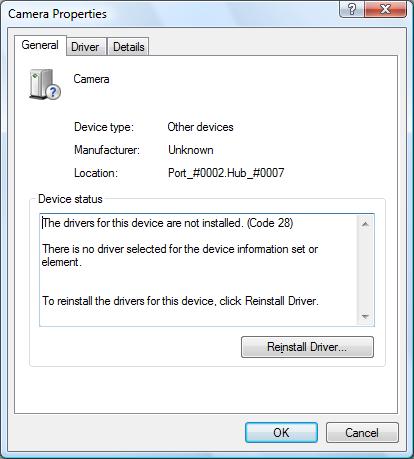
A code 28 error means that there is no driver installed for the hardware device. Most likely Windows does not have a default driver for the device, or it would be installed. This means that a special driver from the hardware manufacturer is required. The code 28 error can occur for any type of device, USB devices, audio devices, video devices, etc. In general, however, the error will occur for the more exotic hardware since Windows already supports quite a few common devices by default.
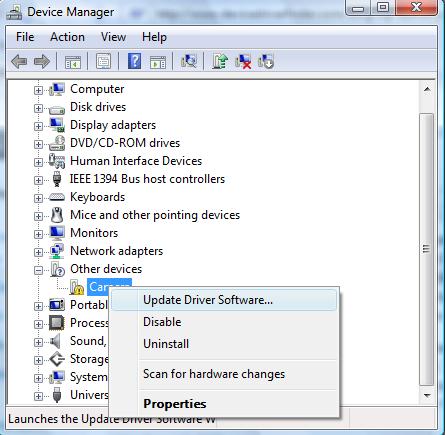
To fix code 28 errors, it is required to install the drivers for the device that is causing the code 28 error. You can use the device manager to update the drivers. Select the device in error, right-click the device, and in the pop-up menu select Update Driver Software (in newer Windows versions, the link is named Update driver). Windows will ask you for the location to install the drivers from, so make sure you download the drivers for the device from the hardware manufacturer’s website first and select the local folder where you saved the download drivers for the update.
If you can not find the drivers for the device in error or are not comfortable with using the Windows Device Manager, you can also use a driver update tool to find, download and update all device drivers for you. A driver update program will accurately identify your hardware, including the device in error, and automatically install the latest drivers for it. This will solve code 28 errors.
It is also recommended to have Windows configured for automatic updates. This will ensure that any new drivers that are supported by Microsoft will automatically install or get updated so that your computer will be compatible with as many devices and hardware as possible.
Entry Filed under: Device Errors
29 Comments Add your own
1. Angels&Demons | July 3rd, 2009 at 9:08 pm
The only problem is that I dont have the driver saved on my laptop. Either it went missing or one of the programmes deleted it, I’m not sure.
Where can I find the drivers for a Mass Storage Controller? Please help!
2. Andy | July 4th, 2009 at 1:23 am
@Angels&Demons – You can try the automatic driver search in the Windows device manager, or use a driver update tools as suggested.
Another option is to check the website of the laptop manufacturer and look for the drivers for your laptop model.
3. drago | July 24th, 2009 at 4:31 pm
sem ze vse probal pa vseeno ne gre
4. Andy | July 24th, 2009 at 4:53 pm
@drago – if you have tried the driver update from Microsoft, you probably do not have the right driver for you hardware device.
5. bianca | September 4th, 2009 at 11:15 pm
ugh. it sucks. i already tried the update thingy. but still, windows cant find the driver.
6. Andy | September 5th, 2009 at 9:22 am
@bianca – what device or hardware do you get the error for? Probably Windows does not support the device by default, so you will need a special driver for it.
Let me know the manufacturer and device type/model details and I might be able to help you.
7. John | February 11th, 2010 at 7:28 am
Same with Bianca. Been trying to resolve this because the wizard can’t seem to find the driver for my Video Controllers and VGA compatible.
My model is an IBM Lenovo Thinkcentre m55 8811-WTL. I checked the IBM website for video drivers and they don’t have any for this model.
:\
I need help.
8. vantran | February 27th, 2010 at 7:55 pm
i have problem with my sound device :\
i tried to fix it but it said that i have to install from the manufacture cd . I tried to install from the cd but it didn’t work . what should i do ? help , please .
9. Andy | March 26th, 2010 at 4:08 am
@John – Sorry for the late reply. In case you have not found the drivers yet, maybe try a driver finder program, like DriverFinder. These programs use the hardware identifiers to match the devices and OS with the right driver.
You can download the program and run a scan and see if it finds anything.
@vantran – With sound devices, always try to uninstall the current drivers first. In the device manager, uninstall the sound device. That will also uninstall the drivers. That way the driver files are not locked when you install the original sound drivers.
10. Eddie W. Givens | May 22nd, 2010 at 7:17 am
I cannot get on the internet with my laptop because the ethernet device has a code 28, so I can’t download from Dell, I have tried to save updates on cd from this computer but it won’t let me Can anyone help me?
11. Andy | May 22nd, 2010 at 4:39 pm
@Eddie W. Givens – You should be able to download the network driver from Dell on a different computer, put it on a USB stick or CD and then install it on the Dell computer.
What is your laptop model?
12. ssc | August 23rd, 2010 at 12:04 pm
thx
13. OKWABI EMMANUEL | December 5th, 2010 at 6:46 am
I can’t find driver for broadcom USH for latitude E6400
14. Andy | December 5th, 2010 at 7:49 am
@OKWABI EMMANUEL – Which Windows version are you looking for?
For Windows Vista the E6400 broadcom modem driver is available from the Dell site.
15. Sanjay | March 17th, 2011 at 8:35 am
The drivers for this device are not installed. (Code 28)
dell windows xp
Pls help me to download this
16. Andy | March 17th, 2011 at 2:44 pm
@Sanjay – If you can list the hardware id of the device with the code 28 error, I can help you get the right driver installed.
Just right-click the device, then select Properties in the popup menu. In the dialogbox, select the Details tab and change the Property selection to Hardware Ids.
17. Daniel | April 8th, 2011 at 12:46 am
Andy, same problem, maybe you can help me. My hardware ids are as follows:
PCI\VEN_14E48&DEV_4318&SUBSYS_50101468&REV_02
PCI\VEN_14E48&DEV_4318&SUBSYS_50101468
PCI\VEN_14E48&DEV_4318&CC_028000
PCI\VEN_14E48&DEV_4318&CC_0280
THANKS!
18. Andy | April 8th, 2011 at 1:00 am
@Daniel – I am not familiar with that hardware ID, not can I find anything on the vendor with that VEN_14E48.
Do you know what kind of device this is? Or in which computer is it found?
19. Krystal | April 16th, 2011 at 3:25 pm
I get the same problem with my soundcard..
hardware id is –
HDAUDIO\FUNC_01&VEN_10EC&DEV_0862&SUBSYS_14627297&REV_1000\4&4CAF987&0&0001
Cheers
20. Andy | April 18th, 2011 at 9:27 pm
@Krystal – That is a Realtek audio device. Try installing the latest Realtek audio drivers and see if that fixes the soundcard driver problem.
21. FARHAN | May 18th, 2011 at 7:42 am
hi i have an acer aspire 5517.
i cannot connect to any wireless network.
in the hardware of my computer i see that the network controller isnt working i guess.. in device summary i see the following:
manufacturer: unknown
location: PCI bus 2, device 0, function 0
device status: the drivers fir this device are not installed. (Code 28)
i don’t have internet connection, wifi nor landline.. what am i to do?
22. Andy | May 18th, 2011 at 3:42 pm
@FARHAN – The Aspire 5517 has a number of options regarding wireless lan devices. The device is either an Atheros or Broadcom device.
Gateway has a small vendor identification utility that can tell you the vendor. If you can download and run that, you can let me know which wireless vendor it is.
Pls also include what Windows version you are running, and I can then provide you the download link to the wireless driver. If you can download that file, and copy it to the Acer, you can install it and connect it to the Internet.
23. jasmine | December 15th, 2011 at 9:18 pm
I have a dell inspiron15(vista) and I have a code 28 on my cd/dvd drive and a code 10 on my SM Bus Controller.. I tried to find an update like you did above but it didnt find anything.. I know the cd/dvd drive isn’t dead because the light still comes on.
24. jasmine | December 15th, 2011 at 9:22 pm
also the driver is installed my code 28 just says that the device could not start..
25. Andy | December 17th, 2011 at 10:46 pm
@jasmine – Many CD/DVD device errors are caused by a registry error. Normally this results in code 39, but it might be that your code 28 is also caused by the same. Please see our solution for the code 39 error to see if it works.
Since you mentioned the SM Bus controller error as well, I would also suggest you try reinstalling the Intel chipset driver for your computer. That should cater to the SM Bus as well as any IDE/SATA controller issues (the CD/DVD is generally connected to either IDE or SATA).
26. dvb man | May 14th, 2013 at 11:17 am
hey I got a dvb card fully working on all previous versions of windows that I had long time ago. anyway i have no problem installing it in my new windows 7 x64. I have tried both ways of installing my device( via autorun in the cd && via update driver wizard in device manager) for several times,both work. the problem is (just in windows 7) every time I leave my pc for a while and it goes to sleep. when I wake it up, the device in the device manager has turned into other devices with a yellow marker (PCI Device) with code 28. when I attempt to reinstall it again it gets installed with no error, but the name is suffixed by #2. (i.e the device is not working. you need to restart the pc) after restart still not working with that #2 sign at the end part of device name in device manager yet. the only way to make the device come back to work is a full shut down + turn off power for a few seconds and back on + turn on the pc.(lol even without reinstalling the driver after phase number 1(PCI Device and code 28)). any idea is appreciated.
27. Andy | May 14th, 2013 at 3:55 pm
@dvb man – That is clearly a problem with the power management of the device driver for the dvb card.
The #2 simply means that Windows installed an exact same copy of the device, and hence it gets the #2. If you repeat the process, you will see #3 also appear. You could try right-clicking the #2 device and uninstalling it, that might bring back the original (could still require a reboot).
The ultimate solution however, is to get an updated driver for the dvb card for Windows 7 x64. What card is it?
28. chandan sahoo | June 28th, 2015 at 11:30 am
i click on update driver softare but it couldnot identify and asking for code 28
29. Andy | June 29th, 2015 at 3:41 pm
@chandan sahoo – What device are you getting the code 28 error on?
Leave a Comment
Trackback this post | Subscribe to the comments via RSS Feed