

Fix Driver Irql Not Less Or Equal Error
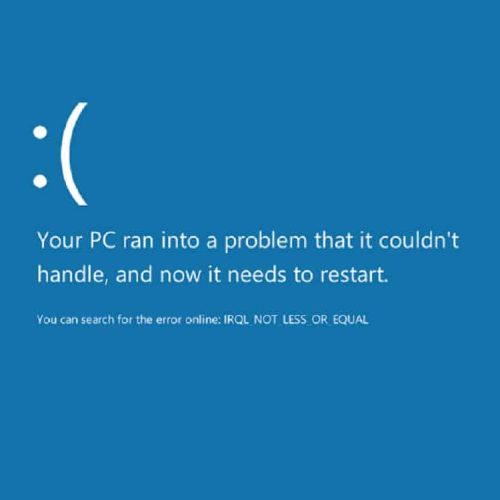
Device drivers are required to allow operating systems to communicate with computer hardware. In each new version of Windows more and more device drivers are included with the installation. But for a lot of hardware, special device drivers are required. If drivers are corrupted or not installed properly, Windows will report a device error. One of the device errors that Windows can report is a “Driver Irql Not Less Or Equal” error. This can result in a blue screen.
Causes for irql not less or equal error
The irql not less or equal error basically indicates a problem with the system resources used by a hardware device, such as I/O address ranges, DMA, and IRQs. The IRQ is an interrupt request, which is used by the hardware to claim CPU time from the system. The number of IRQs in a PC however, is limited so sometimes different devices end up sharing an IRQ.

The Driver Irql Not Less Or Equal error can happen in any version of Windows, from Windows XP to Windows 11. The irql error can happen with the NDIS.SYS file, if the error is caused by a network or modem card, but other hardware can also be the cause of the conflict. Because of the severity of this kernel-level problem, the error results in a blue screen or stop error. Driver errors would normally be obvious because the blue screen error lists a .SYS file.
Fixing the error
#1 – Using the .SYS filename, you can find out which device or hardware is responsible for the error. You can then disable the hardware in the Windows Device Manager to see if the device is really the cause of the error. If the .SYS filename is not shown on the blue screen, use Event Viewer or a memory dump to find out the responsible driver.
#2 – Running a memory test is also a good idea, as faulty memory can be the cause of many stop errors. In the Bios, disable the quick start, so the full diagnostics are run, and a memory test can be run using the software.
#3 – In most cases, the ‘irql not less or equal’ error can be solved by updating the drivers for the device causing the error. Also make sure you update your Windows and antivirus software, as some of these errors are not caused by hardware, but software problems. You can use the Windows device manager to uninstall any currently installed driver for the device and then reinstall the latest driver. When you reboot your PC after uninstalling the drivers, Windows will detect the new hardware, which allows you to install the latest drivers for the device.
If you do not have the drivers for the device in error or are not comfortable with using the Windows device manager, you can also use a driver update program to find, download, and update all device drivers for you. Driver update software will accurately identify your hardware, including the device in error, and automatically install the latest drivers for it. This can solve driver irql not less or equal errors.
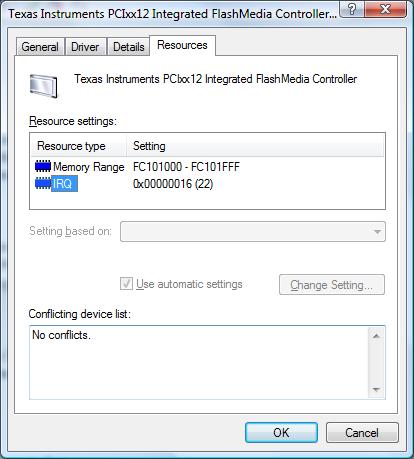
#4 – If updating the drivers does not fix the issue, try loading the default BIOS/UEFI options. This will ensure that RAM timing, FSB timing, and CPU timing are not causing the error. Further, you can check the resource assignments on the devices in the Windows Device Manager to check if there is an IRQ conflict.
#5 – Microsoft further advises that you try to load the last known good configuration using the start menu (press the F8 key during boot). But you do need to make sure that the problem does not introduce itself again as a result of changes or updates. So the best way is to find the real cause of a blue screen error and fix it.
And, for people that are still running Windows 2000, there is another possible cause for the driver_irql_not_less_or_equal error. It is related to dismounting drive volumes. Check the Microsoft knowledge base article on this to fix it.
Although we wrote this article originally with older Windows versions in mind, the error can still occur in the latest Windows versions. The basis approach to solving the error is the same, even for Windows 10 and Windows 11.
Entry Filed under: Device Errors
92 Comments Add your own
1. heatherwilkes | September 27th, 2011 at 9:50 am
Dear Author,
I like the way you explained this, in a combination of plain english and technical terms, b/c not everyone is a CIS major, but almost everyone gets a scary blue screen eventually. 4 stars, very well done & thanks! Wish me luck!
2. Andy | September 28th, 2011 at 1:57 am
@cody – If the stop error happens every time, even in Safe Mode, then it is most likely a hardware issue, since only the minimal required drivers are loaded in Safe Mode.
Have you checked the temperature? Is the system running hot?
Other than that, you can test the RAM to exclude the memory as the cause of the BSOD.
3. JAime Alvelo | September 28th, 2011 at 3:41 am
Andy:
Regarding my Blue Screen of Death when I connected to the Internet via modem you were right it was not the modem. I have Conexant modem in my portabke and bought aan external USB modem. Uninstalled the Conexant and ran the USB modem….same problem–BSOD. So I ran MSCONFIG and de-activated all the start up programs. Then I connected to the Internet and here I am. Thus I conclude that it is what you were saying- a driver/program conflict for memory space or IRQ of modems software with other program software.
The challenge is determining what or which specific program loaded at startup causes the crash? Not having a diagnostic software for this I would have to slowly add each of the programs I disabled at startup to see which causes the crash…Now with 35 programs at startup and not remembering when none of them were installed I have the challenge of finding the time to disable each one by one until I find the correct one (the bad guy)…there must a better way.
Jaime
4. JAime Alvelo | September 28th, 2011 at 5:02 am
Andy: In the process of using the USB modem I had to remove the Conexant Modem Driver two times as I had not taken it out of my portable. That meant going to Start; Control Panel; Phone and Modem Options; Modems; Click on Conexant and Remove. Tha means that the system each time I did a Restart would find the device and install the driver. Well I went back to Run: MSCONFIG and enabled all the Statup files. I did a Windows System check for IRQ & Memory Conflicts and also ran Dr. Watson’s Diagnostic Tool. I found no conflicts. So I disconnected my USB modem and tried my old Conexant internal modem again. To my surprise the PC connected alright to my internet provider; I waited a minute or two; nothing happened; I loaded my Internet Explorer and it loaded nicely; waited a couple of minutes and I’m still connected. I call that luck. My intuition tells me that removing the modem driver and having it reinstalled by the device manager automatically when finding the hardware may have fixed a corrupted modem driver. That is my hypothesis but as I’m not sure…it’s pure luck that I was able to fix it.
Jaime
PD: Reading this section helped
5. Andy | September 28th, 2011 at 2:39 pm
@JAime Alvelo – Thanks for sharing your experiences. It is very possible for a hardware configuration to become corrupted. Normally the hardware would not function correctly, but in your case it even resulted in blue screen errors.
Uninstalling the device and then letting Windows redetect and install it again will reset the configuration, but it does not always fix the issue. I am glad it did in your case though!
PS. Regarding the disappearing of your solution, that’s because the blog has comment moderation on. Comments need to be approved before they remain permanent. Your comments will remain visible now.
6. Jaime Alvelo | September 28th, 2011 at 4:58 pm
Thanks Andy!
7. Tóth Mátyás | October 11th, 2011 at 2:46 am
I have a Logitech USB mouse.
I only get the driver irql fault when it is pluged in, but I not always get the fault when it is pluged in. I used the mouse like a week and I did not get any faults. Yesterday I started to get dose bluescreens again.
Could it be because of the mouse?
P.S.: Most of the time I got the bluescreen when I did nothing with my computer, not moving the mouse or writing, just reading or not even using it.
8. Andy | November 9th, 2011 at 1:14 pm
@Tóth Mátyás – Although the mouse could be the cause, that would most likely be a USB error, I would also recomment running a memory (RAM) test. Random irql errors like that are more often caused by memory errors, since memory is used randomly and dynamically.
But simply try unplugging the mouse, start your computer and let it run for a day to see if that is the cause.
9. Matt | December 3rd, 2011 at 2:56 am
I’ve XP and have been getting the irql error-
I get the message when streaming video or when my kids play games on the internet.
I’m in the process of updating out of date drivers, but have lost the irql error information and am loathe to intentionally get the BSOD on purpose again.
Any guess which driver is causing the problem? Thanks for any help that can be provided, this is very informative stuff!
10. Andy | December 3rd, 2011 at 8:26 am
@Matt – The best way to see which driver is indeed the mention of a .SYS filename on the BSOD itself. But if you cannot or do not want to get the BSOD to see that, it is also possible to identify the most likely driver from the minidump file.
But you need to run the minidump through the windows debugger to see that, and that takes a bit of effort and knowledge to install and run.
So in your case, from your description, I would recommend that you update or reinstall the network driver (or wireless lan driver if you use wireless Internet), and also the video driver.
11. jenny | January 3rd, 2012 at 2:18 pm
hi… can anyone help me? i get the error driver irql nott less or equal very often now… first it was like 2-3 times a day… looked into device manager checked each one(resources) i found one that it is in system devices called pci standard pci-to-pci bridge that it says “this device isn’t using any resourcers because it has a problem” driver details: \system32\DRIVERS\pci.sys please can anyone tell what should i do? thanks a lot..
12. Andy | January 3rd, 2012 at 3:54 pm
@jenny – The PCI bus is a bus type on the motherboard, and can be used for expanding a computer’s functions (like a video card or network card).
The PCI bus is supported by the motherboard chipset, and as such, it would be best to first try and reinstall the chipset drivers for your computer motherboard.
That can be an Intel chipset driver, VIA, nForce, really depends on the computer brand or motherboard brand. If you can let us know the details of your computer, I can try and provide a link. Also include your Windows version please.
Another option is to run a command prompt, and type “SFC /SCANNOW” followed by Enter.
This will check the Windows system files and tell you if something is wrong (and offer to fix it). You need to use an administrator account for this.
13. jenny | January 3rd, 2012 at 7:44 pm
hi andy… thanks for your reply… i have a presario cq60 212ea and i run windows 7 on it… hope you can help me… tks…
14. jenny | January 3rd, 2012 at 8:45 pm
tried with comand prompt as you said no violations were found…
15. Andy | January 3rd, 2012 at 11:03 pm
@jenny – The compaq presario cq60 uses an nforce chipset from nvidia, so from the HP website you can download the nforce chipset drivers for that model.
The link I provided is for the 32-bit version. If you have Windows 7 64-bit, you need to select that.
16. Joanne | January 17th, 2012 at 12:15 am
I am getting the blue screen and errors…when i see the blue screen it shows agnfilt.sys as the file name… anyone know what this is… ?
17. Joanne | January 17th, 2012 at 12:25 am
Driver IRQL not less or equal error…. addl info…from my earlier post… My husband is getting the same error with the same file. (agnfilt.sys) We work for the same company…both have the same standard image and the same file showing up on the BSOD …the
18. Andy | January 17th, 2012 at 2:12 pm
@Joanne – The agnfilt.sys is part of the AT&T AGN client. Have you recently installed that software, or made changes to it?
You can try upgrading to the latest version of the AGN client first.
But I would also run a check for viruses and malware, as some rootkit viruses can also cause this behavior.
19. Ricardo Pollack | March 27th, 2012 at 2:51 pm
Hello, I have an Asus that came with Vista, and I loaded windows 7 premium 32 into it. I repeatedly get the blue screen Driver IRQL event when I talk on Skype or occasionally another soft phone — that is the only thing that prompts the BSOD — anybody have an idea?
20. Ellie | March 28th, 2012 at 11:47 am
I would like to try the methods suggested here to solve the issue but when I try log into Safe Mode or Startup Repair, the computer will say it is loading files and then loop back up to the start-up screen. Sometimes it will turn to a blank screen; once it told me something similar to: “The file could not be loaded. It may be corrupt.”
Is there anything I can do?
21. Andy | March 28th, 2012 at 4:59 pm
@Ricardo Pollack – From my experience the most likely candidate in such cases is a network driver (ethernet or WiFi depending on if you are using a cables or wireless network). Try if there is a newer driver for it.
If it was a software problem Skype itself would crash, not no BSOD. You can try an older version of Skype of course just to make sure.
@Ellie – That sounds like there is a problem with the hard disk that Windows is installed on. The best thing to try is to start Windows from a recovery CD, so you can run a disk check on the HDD.
22. Ricardo Pollack | April 16th, 2012 at 12:10 pm
Hello Andy, I get the BSOS with wireless or ethernet, I have checked and to the best of my knowledge, the two drivers are up to date. I also get the BSOS with other soft phones, like the X-lite.
Any other suggestions? I will have to buy a new computer if I can’t fix this.
23. Andy | April 20th, 2012 at 11:53 pm
@Ricardo Pollack – If the drivers are up to date, and you have it on all networking devices, it is more likely to be an overall networking issue.
Try running the “SFC /SCANNOW” command at a command prompt with admin rights.
That will check and try to fix the Windows system files, so if the cause is in the Windows networking files, this might fix it.
24. Ryan | May 22nd, 2012 at 6:23 pm
Andy, I’m experiencing the same issue that “SS” posted last year. I’m also getting “driver_irql_not_less_or_equal” on the BSOD. Under ‘technical information,’ “Anodlwfx.sys” is listed.
Some background information: this is a newly built computer. Last weekend, it worked flawlessly while connected to the Internet via a wifi dongle at my house. However, I moved it into my apartment from my house last weekend, and that’s when the BSOD started showing up. I am connected via an Ethernet cable into a router at the apartment (I left the wifi dongle at home because I figured I wouldn’t need it). Thanks ahead of time for the help!
25. Ryan | May 22nd, 2012 at 6:29 pm
I’m running windows 7*
26. Andy | May 24th, 2012 at 5:05 pm
@Ryan – The Anodlwfx.sys file is a driver file for your wireless network dongle. The problem probably occurred since the WiFi dongle is no longer present.
The best thing is to uninstall the wifi dongle in the device manager, so that the drivers are no longer a problem.
Not sure if you can do that without the dongle being inserted. But you can try using the option in the device manager to show unplugged devices.
27. Maninder | May 30th, 2012 at 6:42 pm
In my pc iqrl problem shows win32k.sys in techanical information what should i do to resolve problem
28. Andy | May 31st, 2012 at 9:55 pm
@Maninder – the win32k.sys file can cause a bsod in different scenarios since it is a commonly used Windows kernel mode file.
It could be a driver, so check if you made recent changes or try updating the drivers.
But a program can also cause the error, so see if it happens with a specific program or during a specific action. If the error happens (seemingly) randomly, chances are it is caused by a device driver. Possibly a chipset driver.
29. Navpreet | May 28th, 2013 at 9:46 am
I have installed Window 8 recently and facing the problem of Irql. I am not able to figure out what the problem is. Whenever I connect my device to Broadband Connection it shuts down by reporting a IRQL eroor . any solution ?
30. Andy | May 29th, 2013 at 10:25 am
@Navpreet – What is the complete error message?
From your descriptions so far, the most likely cause is a problem with your network drivers. Have you tried updating the drivers or reinstalling them?
Leave a Comment
Trackback this post | Subscribe to the comments via RSS Feed