

How to Check the Hardware ID for a Windows Device
All hardware equipment inside and connected to personal computers uses an identifier to uniquely identify itself. This allows operating systems to recognize the device and install the necessary software for it. In Windows, this generally means that a device driver for the hardware is installed. The hardware ID for a device can be checked to locate a driver for it.
The hardware identifier is a combination of the bus type, the hardware manufacturer (or vendor), and the device identifier. In some cases, additional sub-system identifiers and revision information is included to distinguish between variations of a device.
So when you are looking for a device driver for a piece of hardware, it is useful to know the hardware id of the device. This can tell you which manufacturer made the device and help you find a device driver. Read on to find out how to check the hardware ID for a device in Microsoft Windows. The steps are valid for Windows XP all the way up to Windows 11.
Check the Hardware ID using the Windows Device Manager
The hardware id for a device in Windows can be found in the Windows Device Manager. To check the hardware id for a device, follow these steps:
- Open the Device Manager from the Control Panel. You can also type “devmgmt.msc” at the Run option in the Start menu (or menu Search option for Windows 7 and newer).
- In the Device Manager, right-click the device, and select Properties in the popup menu.
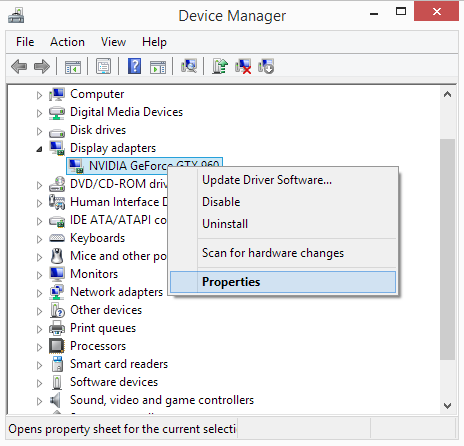
- Next, select the Details tab.
- Now select the entry called Hardware Ids in the Property dropdown list.
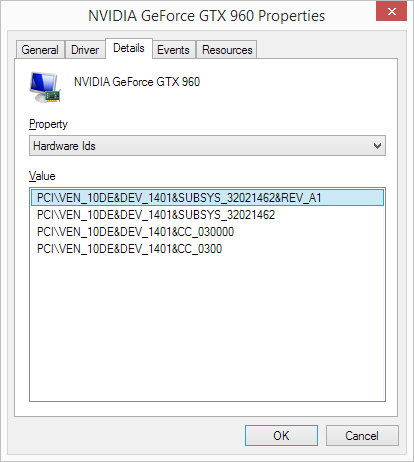
As you can see in the screenshot, there can be multiple hardware ids for a device. The top one is the most specific identifier, and going down, the identifiers are more generic. The reason this is done is to allow a device driver to be selected based on a match to any of these hardware identifiers. This allows drivers to be used that are applicable to variations of devices.
The hardware manufacturer in this example is NVidia, which is identified by VEN_10DE.
Obviously, this is a device for which a driver is already installed, and the manufacturer and model for the device are shown. But the hardware id is also available for unknown devices and not recognized devices. This way, the hardware id, or Windows device ID, can be used to find the correct driver for the device. If no exact match for the driver is available, you can also check out the Compatible Ids by selecting that as the Property selector.
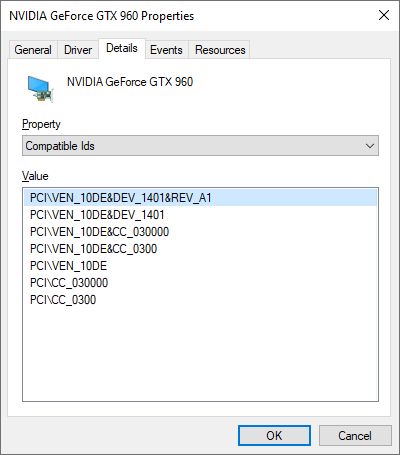
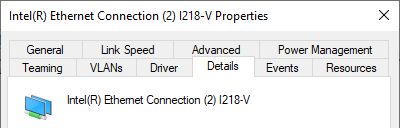
Note: Depending on the hardware device, the number of tabs in the device properties dialog will vary. But there will always be a Details tab as used in the steps in this guide.
Programs like DriverFinder use the hardware id and the compatible id to find a matching driver for a device as well. This way these programs can find a driver for a device to match the hardware and Windows version.
FAQs
What is a hardware ID?
The hardware ID for a device is an identifier for a piece of computer hardware. Think of a sound card, or a webcam, for example. The hardware ID is vendor-specific. A hardware ID consists of a device class, vendor identifier, device identifier, subsystem identifier (different versions of the device), and a revision number. An example of a hardware ID is: PCI\VEN_8086&DEV_9A49&SUBSYS_14321043&REV_01
Revisions can be used for updates of firmware on the same device for example.
Is hardware ID the same as Device ID?
Yes, the hardware ID is often referred to as the device ID.
Is the hardware ID the same for all Windows versions?
A hardware ID is specific to a device. So, it is linked to the equipment, not the operating system. The hardware ID will not change for different Windows versions.
How do I find the hardware ID?
The hardware ID for a device can be found in the Windows Device Manager. In each version of Windows, the steps are the same. Open the Device Manager, right-click the device, select Properties, select the Details tab, and under Property select Hardware Ids. The Value shown contains the hardware ID(s) for the device.
What is the hardware ID used for?
The hardware ID is used by Windows to identify the device and find a device driver for it. Microsoft finds a driver in the repository or the Windows Update catalog. If no driver is available with Microsoft, a driver from the manufacturer needs to be installed to allow communication between Windows and the device.
What is a compatible ID?
The compatible IDs for a device are also hardware IDs. The difference is that a hardware ID is unique to a single device, while compatible IDs can apply to multiple devices. The compatible IDs identify the device as a piece of equipment of a certain category that can be used for certain functions. This is important if no unique device driver is available for a device. A driver for a compatible ID of the device can enable Windows to still communicate with the device.
Do Virtual Devices also have a hardware ID?
Yes, virtual devices in Windows also have a hardware ID. These devices also need software to function, and need to be identified as a device within Windows. Examples are:
Intel(R) Virtual 82566 Gigabit Network Connection (PCI\VEN_8086&DEV_10B7)
Logitech Gaming Virtual Mouse (LogiDevice\VID_046D&PID_C231)
HP 530T DP Virtual Bus Device (pci\ven_14e4&dev_16af&subsys_18d3103c)
Entry Filed under: Device Drivers
318 Comments Add your own
1. Fernando Portillo | December 20th, 2017 at 3:47 am
PCI\VEN_1180&DEV_0592&SUBSYS_30CF103C&REV_12
PCI\VEN_1180&DEV_0592&SUBSYS_30CF103C
PCI\VEN_1180&DEV_0592&CC_088000
PCI\VEN_1180&DEV_0592&CC_0880
2. Andy | December 20th, 2017 at 4:50 am
@Fernando Portillo – You did not state which Windows version…
But try this Ricoh 5-1 card reader driver.
3. Alex | February 7th, 2018 at 12:14 pm
PCI\VEN_168C&DEV_002B&SUBSYS_1461103C&REV_01
PCI\VEN_168C&DEV_002B&SUBSYS_1461103C
PCI\VEN_168C&DEV_002B&CC_028000
PCI\VEN_168C&DEV_002B&CC_0280
4. Muris | August 18th, 2019 at 6:13 pm
Please can You help me with this driver, Dell XPS 1530, W10 32-bit.
Thank you
PCI\VEN_1180&DEV_0843&SUBSYS_022E1028&REV_12
PCI\VEN_1180&DEV_0843&SUBSYS_022E1028
PCI\VEN_1180&DEV_0843&CC_088000
PCI\VEN_1180&DEV_0843&CC_0880
5. Andy | August 19th, 2019 at 7:38 pm
@Muris – Don’t think there is a Windows 10 driver for that Ricoh card reader. But you could try the Windows 7/8 version and see if that will work.
6. Rick | January 18th, 2020 at 5:11 am
Using your blog page, I tracked this hardware id:
PCI\VEN_14B9&DEV_A504&SUBSYS_500001 4B9&REV_00
to a CISCO aironet wireless 802.11b device.
However, when i downloaded the driver and installed it. My device manager still shows the driver missing for unknown network controller. Any advice you could give would be awesome.
thank you
7. Andy | January 20th, 2020 at 8:54 pm
@Rick – Assuming you did not get any error installing the driver, and it is the right driver, you might still need to manually select the new driver for the unknown device.
Select the unknown device in the Device Manager and than update the driver and manually select the driver location for it and ensure you select the location of the driver INF file.
If that does not work, the driver is either not compatible with the device or with the Windows version.
8. Wali | April 1st, 2020 at 7:40 pm
USB\VID_0471&PID_2127\6&C738363&0&7
I found this driver ID for a webcam normally used on Philips TV, but i hoped i could use it for windows, i am running windows 10 rn, but i dont know what to do with it.
Can you help
9. Wali | April 1st, 2020 at 7:53 pm
Correction from my last comment
This is the hardware id
USB\VID_0471&PID_2127&REV_0000
USB\VID_0471&PID_2127
10. rskp | April 15th, 2020 at 12:01 am
Hi,
Can someone suggest the missing wireless drivers I need to install on HP Pavilion dv6-1350us notebook? Now, Windows 10 is running that is, it was upgraded from Windows 7.
The wireless LAN driver is missing on HP Pavilion dv6-1350us during hard reboot. And, up to which point, I was able to access internet wirelessly. Can you please suggest the driver I need to install on the laptop?
It is now upgraded to Windows 10 from Windows 7.
The driver was missing much before the upgrade to Windows 10 during the hard reboot. With the wireless driver missing, another error was popping up with each (normal) reboot. The error is as follows. “Bluetooth Software licnense file not found. [2]”. But, this error was NOT popping up anymore after the upgrade. It was taken care of with the upgrade, I think.
The error, in regard to missing wireless driver, upon normal reboot is as follows “HP Wireless Module not found. The system has detected that the wireless module is not installed correctly or not functioning. Wireless Module (701) “.
Can someone please suggest the (missing) wireless drivers I need to install on HP Pavilion dv6-1350us? OS is Microsoft Windows 10 (upgraded from Windows 7)
Thanks
rskp
11. RSKP | April 16th, 2020 at 12:01 am
Sorry, I did not realize the message I posted earlier today was not gone anywhere. But, I did before posting again the same question. Sorry again!
Please suggest to me the missing wireless LAN drives I need to install on HP Pavilion dv6-1350us (Windows 10 64-bit) so that I can connect to the internet wirelessly.
Appreciating your help!
Thanks
rskp
12. Andy | April 29th, 2020 at 4:45 pm
@rskp – From what I can see, that HP notebook model has different wireless configurations. Do you know if you have the manufacturer brand of your wireless device?
Best check the hardware ID in the device manager and post back with that, so we can recommend a compatible driver for you.
There might not be direct Windows 10 support for this model, but chances are the Windows 7 drivers will work, or you can use generic drivers for the device from the manufacturer rather than HP.
13. Andy | April 29th, 2020 at 5:11 pm
@Wali – To my knowledge, the USB\VID_0471&PID_2127 device does not have a Windows driver available.
If you found one, it is probably for an older Windows version, and not for Windows 10.
You can always try:
1) running the installer in XP compatibility mode.
2) manually selecting the driver from the Device Manager (select the webcam usb device and open the driver folder containing the INF file).
Hope it works!
14. Rja | August 24th, 2021 at 11:38 pm
PCI\VEN_1022&DEV_1486&SUBSYS_87C01043&REV_00
PCI\VEN_1022&DEV_1486&SUBSYS_87C01043
PCI\VEN_1022&DEV_1486&CC_108000
PCI\VEN_1022&DEV_1486&CC_1080
15. admin | September 23rd, 2021 at 1:59 am
@Rja – That is an AMD PSP device. You should install the AMD chipset drivers for your system.
16. John Panakkal | October 17th, 2021 at 6:48 pm
HI
I HAVE ISSUES , MY LAPTOP IS BLOCKED THROUGH DEVICE ID , I CANNOT ABLE TO USE , CAN WE CAN ABLE TO CHANGE DEVICE ID
17. Andy | December 3rd, 2021 at 2:59 pm
@John – Seems you did not get any repies to your comment, but from my perspective, you’ll need to elborate on your the statment. Laptop blocked by the device ID? What does that mean?
18. Repair Code 28 Device Err… | April 5th, 2022 at 7:25 pm
[…] to find, download and update all device drivers for you. A driver update program will accurately identify your hardware, including the device in error, and automatically install the latest drivers for it. This will […]
Leave a Comment
Trackback this post | Subscribe to the comments via RSS Feed